


- Freeto play
- #27in Puzzle
- Nodownload
- Alldevices
About Brainrot Sudoku
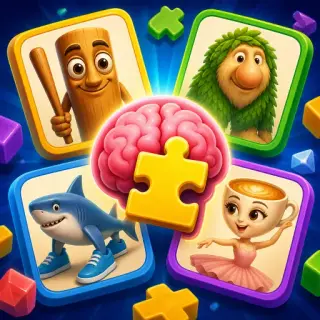
Brainrot Sudoku is a logic puzzle that changes the look of a classic sudoku grid. Instead of placing numbers, you work with brainrot-themed elements and meme-inspired visuals. The goal is still to think carefully, read the grid, and place the right element in the right spot. Its brainrot theme gives the puzzle a funny, chaotic feel, while the core challenge stays focused on logic. It is made for players who enjoy sudoku but want a sillier style inspired by internet culture.
Each round is about observation and deduction. Click a cell, choose your move, and keep checking the grid so every placement makes sense. Because the puzzle uses themed elements instead of plain numbers, you need to pay close attention to what each space already shows. The fun comes from mixing a familiar puzzle format with unusual brainrot visuals, which can make the grid feel fresh while still testing your thinking. Brainrot Sudoku plays free in the browser, so you can start solving without a download.
Highlights
- Sudoku-style logic with a brainrot theme
- Meme-inspired elements instead of numbers
- Single-player casual puzzle play
- Click-based controls
- Free browser play with no download
Who will enjoy it
Brainrot Sudoku is good for players who like calm logic puzzles with a funny visual twist. It also fits anyone who wants a casual single-player puzzle that is easy to start.
How to play Brainrot Sudoku
Click the sudoku grid and place the brainrot-themed elements where they belong. Use logic to decide each move, avoid random guesses, and complete the grid correctly to finish the puzzle.
📱 Touch controls
Click cells to fill the sudoku grid.
⌨️ Keyboard and mouse
Tips
- Start with the parts of the grid that already have the most filled spaces.
- Use elimination before placing an element, especially when several cells look possible.
- Pause after each placement and check how it affects nearby empty cells.
- Do not guess too early; one wrong placement can make the rest of the grid harder to read.
Game details
- Category
- Puzzle
- Tags
- Puzzle, Brainrot, Brainrot Italian, Sudoku
- Controls
- Mouse, Keyboard, Touch
- Screen
- Portrait
- Works on
- Phone, tablet and desktop
- Added
- November 2, 2026
- Price
- Free
Brainrot Sudoku questions
Is Brainrot Sudoku free to play?
Yes. Brainrot Sudoku is free to play in your browser.
Can I play Brainrot Sudoku on a phone or computer?
The game uses simple click controls. On a computer, use your mouse to click and play; on a touch screen, tap works like a click if your device supports browser play.
What is the goal in Brainrot Sudoku?
Your goal is to complete the sudoku-style grid using brainrot-themed elements instead of numbers. Each placement should be made with logic.
Does Brainrot Sudoku use numbers?
No. This version replaces the usual numbers with brainrot-themed elements and meme-style visuals.
What are the controls for Brainrot Sudoku?
The controls are simple: click and play sudoku. Select cells and make your placements with the mouse.